
· Michael Avdeev · Guides · 9 min read
SQL Server Data Masking for Healthcare Migrations
Healthcare SQL Server migrations have a masking problem.
The setup is nearly always the same. A health system has a dozen legacy databases full of patient records, claims and case data, several of them older than anyone currently maintaining them, and all of it is getting consolidated into one warehouse. The masking is happening by hand. Table by table, by an engineer with a spreadsheet and a deadline.
Then four things go wrong, usually at once.
Nobody has a full map of which columns actually hold PHI. The loads that already ran weren’t masked at all, because the first few happened before anyone thought to ask. The masking that did happen covered whatever columns somebody remembered. And the engineers who need to build on the warehouse can’t point an AI tool at any of it, because nobody wants to sign off on that exposure.
Underneath all four is the same thing: masking got scheduled as its own project, running alongside the migration instead of inside it.
Why manual SQL Server data masking falls apart at scale
Hand-rolled masking is fine when you know your schema. A hundred tables, a short list of obvious columns, a few UPDATE statements, done.
It breaks down on databases nobody fully understands anymore.
Legacy clinical and claims systems accumulate junk. A field called NOTES holds free text that sometimes has a date of birth in it. A column named REF_2 turns out to hold member IDs because somebody repurposed it in 2014 and the person who knew that has left. ADDR_LINE_3 is empty for 400,000 rows and then carries a full street address for 9,000 of them. None of this is in the data dictionary, since the dictionary describes what the columns were designed for.
So people miss things, and not because they’re careless. Working out which columns hold protected health information means looking at what’s inside them, and a schema review only describes structure.
That’s the gap most database masking work falls into. Masking a column you’ve already identified is easy. Identifying it is the part that quietly gets assumed.
What follows from that is expensive in three different ways.
You can’t state your coverage. You can list the columns you masked. Nobody can list the columns that held PHI, and that second list is the one an auditor is actually asking for.
Data that already migrated stays unmasked. Masking from here forward does nothing for the loads that landed last quarter. That data is sitting in the warehouse right now, in scope.
The warehouse ends up untouchable. If you can’t prove what’s in it, the only safe assumption is that all of it is PHI. So the analysts work under full HIPAA controls on a dataset that might be 95% harmless, and any conversation about AI tooling stops before it starts.
Put the masking inside the pipeline
Your ETL already reads from the source and writes to the warehouse. Add a step in between. Records arrive carrying PHI, leave masked, and land in the warehouse the same way they would have anyway.
Two ways to wire it up, and neither is better. It depends on what your pipeline looks like:
- A local endpoint in Docker. Run the container inside your network and point the ETL step at it. Easier if your jobs already make HTTP calls, or if you’d rather not link a library into them.
- The native SDK. Call it directly, no network hop. Easier if the ETL is your own code.
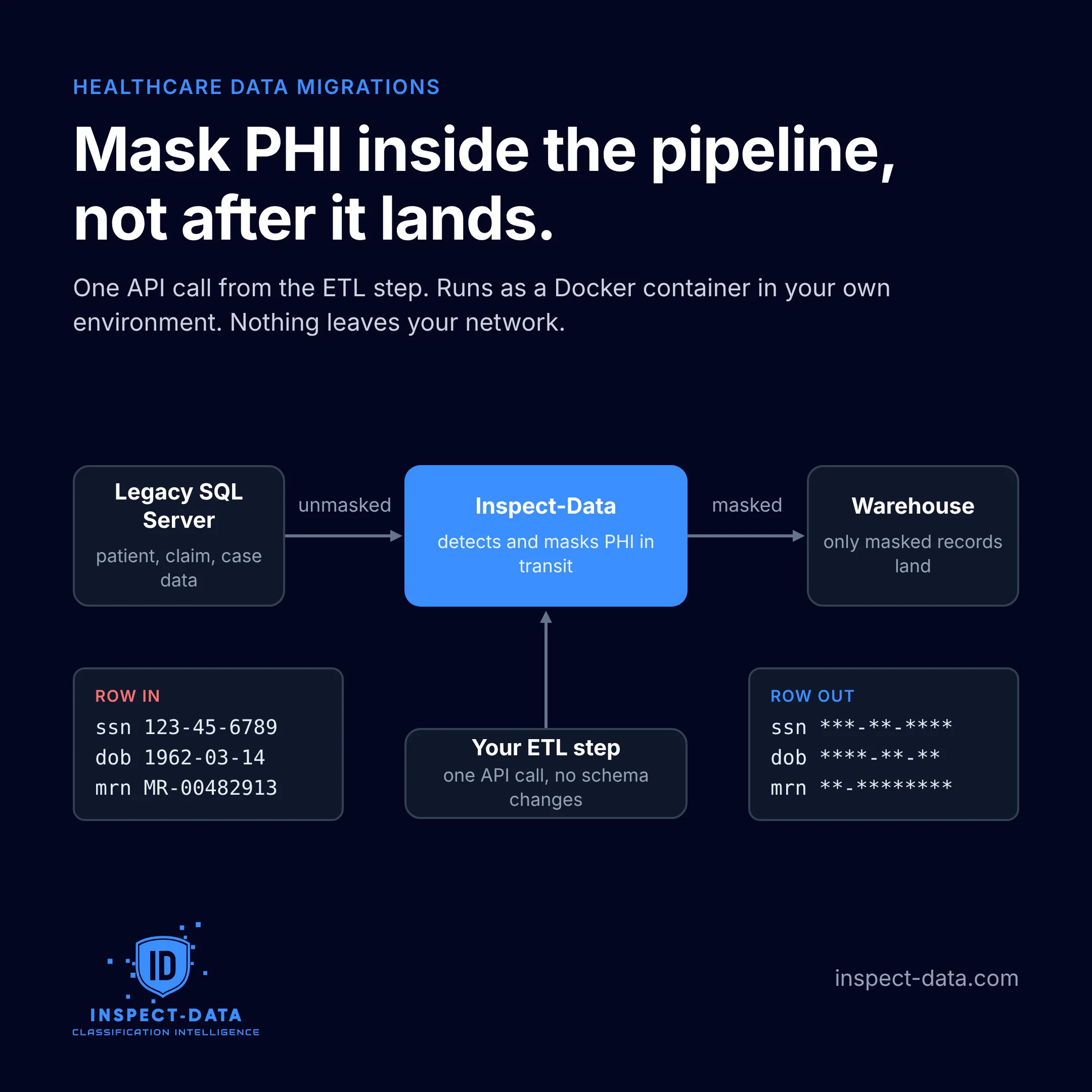
Either way, the warehouse schema doesn’t change. A masked record has the same shape as an unmasked one. Column types match, lengths match, foreign keys still join. Nobody has to ask the warehouse team to accommodate the security team, which is usually where projects like this die.
What gets detected
Most data masking tools get thin here, so it’s worth being specific. Tabular data and free text are genuinely different problems.
For tabular data it’s column-level classification. The engine reads what’s in the column rather than what it’s called, which is how you catch something like REF_2.
For free text it’s row-level. Clinical notes, comments, intake narratives, call transcripts. There’s no column to classify, because the whole field is prose and the identifiers are scattered through it. You have to work on the text itself and mask only the spans carrying identifiers. Mask too aggressively and the notes stop being useful, at which point there’s no reason to keep them in the warehouse at all.
Coverage comes in three layers:
- HIPAA identifiers out of the box. Names, dates, MRNs, account numbers, device identifiers, the standard list, no configuration needed.
- Your own formats. Every health system has its own MRN pattern, plus internal case numbers and whatever legacy account formats arrived with the last acquisition. These are configurable, and honestly this is where most evaluations get decided.
- Whole-document classification. Not just field matching. A benefits explanation gets recognized as a benefits explanation, which matters when the individual identifiers wouldn’t tell you much about how sensitive the document is.
The same engine does two other jobs
Worth knowing, because the migration isn’t the only place this comes up.
Scanning what already migrated. Point the same engine at the warehouse tables that loaded before masking was in place, and you get an inventory of what’s sitting there unmasked. It’s the same discovery work as finding hidden PII and PHI.
Sitting in front of AI and MCP traffic. Once the engine is running in your network you can put it between your engineers and whatever model they’re using. Queries and responses pass through, identifiers get masked on the way, and the engineering team works against real data shapes without PHI reaching the model context. There’s more on that pattern in AI and GenAI data governance.
Nothing leaves your network
First question on every healthcare call, so: it runs in your environment. Your Docker host, your SDK process, your VPC. During a scan there are no outbound calls except the license check. Patient records, claims, notes, none of it goes anywhere.
No vendor cloud holds a copy. Which also means there’s no BAA conversation about a third party processing PHI, because there isn’t a third party.
Static and dynamic masking
The terminology causes a lot of confusion in vendor conversations, so quickly:
Static data masking writes the masked values permanently. What’s in the warehouse is masked and you can’t recover the original from it.
Dynamic data masking leaves the stored data alone and masks it at query time depending on who’s asking. SQL Server ships a feature under this name. It’s useful, but the real data is still sitting in the table, and anyone who can reach the underlying storage, or who finds a query path the rules didn’t anticipate, sees the original. Treat it as an access control, not as data minimization.
For a migration you want static masking in the pipeline. The warehouse never receives the identifiers in the first place, so a permissions mistake two years from now can’t expose something that was never written.
Column-level encryption comes up in the same conversations. Also useful, also a different problem. Encryption keeps data safe from someone without the key, but your analysts have the key, and what they’re querying is still PHI.
What about synthetic data generation?
This comes up constantly and it’s worth separating out properly.
Synthetic data generation produces artificial records that keep the statistical shape of the original without containing anyone’s real information. No actual patient appears in the output, which makes it very appealing the moment HIPAA enters the room.
It’s good at plenty of things. Populating dev environments, load testing, training models where you care about distributions and not individuals, handing a vendor something realistic to work against. If that’s your situation, generate synthetic data and skip masking entirely.
For a migration it doesn’t work, and not because of quality. The warehouse has to hold the real records. Claims need to reconcile against real patients, longitudinal analysis has to follow the same person across years, and finance needs the totals to tie back to what was actually billed. Synthetic records can’t support any of that, since the whole point is that they don’t correspond to anyone.
They solve different problems. Reaching for synthetic data during a migration usually means a test-data requirement got mixed up with a production one.
Does masking make the data de-identified under HIPAA?
Sometimes. It depends how you go about it.
HIPAA gives you two routes. Safe Harbor means removing all 18 specified identifier types and having no actual knowledge that what’s left could identify someone. Expert Determination means a qualified statistician documents that the re-identification risk is very small.
Stripping the 18 identifier types is the mechanical part of Safe Harbor, and tooling can do that part. What tooling can’t do is make the determination, especially once free text or unusual combinations of quasi-identifiers are involved. You can mask every name and MRN in a dataset and still identify a patient from a rare diagnosis in a small county.
So masking in the pipeline puts you in a position to claim Safe Harbor, with documentation of what was found and what was masked. It doesn’t make the claim for you. Any vendor telling you their product makes your data HIPAA de-identified on its own is overselling.
What an evaluation looks like
If you’re mid-migration and masking by hand right now, the test is small. Run the container against a sample database and point one ETL step at it.
Two things come out of it:
- A masked run on a real pipeline. Your schema, your loads, your warehouse. Not a demo dataset.
- A hit rate on your own MRN format. Generic HIPAA identifier detection is table stakes by now. What you need to know is whether the engine catches your medical record number pattern, in your columns, and buried in your free text notes.
If the hit rate isn’t good enough, you’ve found that out in an afternoon rather than three months into a rollout.
The bottom line
Manual SQL Server data masking doesn’t fail because engineers are careless. It fails because working out what to mask is a content problem that a schema review can’t answer, and because the masking runs as a separate project from the migration it’s meant to protect.
Move it into the pipeline. Mask on the way through, scan whatever already landed, and keep the engine inside your own network. The warehouse arrives clean, you can say what’s in it, and your engineers can finally have the AI conversation they’ve been asking for.
Your data. Your environment. Full visibility.
Planning a consolidation? Read the secure data migration guide for the wider checklist, see Risk Finder for how the classification engine deploys, or talk to us about a pipeline evaluation.